Choosing AI Models for DAX: What Benchmarking 70 Models Revealed
AI can speed up Power BI development, but DAX is still a sharp edge. In a benchmark across 70 AI models, the main failure pattern was not weak business logic. It was DAX grammar: missing commas, wrong function names, invalid notation, and SQL or Python habits leaking into DAX.
That matters because a generated measure can be logically correct and still be unusable. In Power BI, one skipped optional argument or one borrowed SQL function is enough to break the expression.
The Core Lesson: Review DAX Syntax Before You Review the Logic
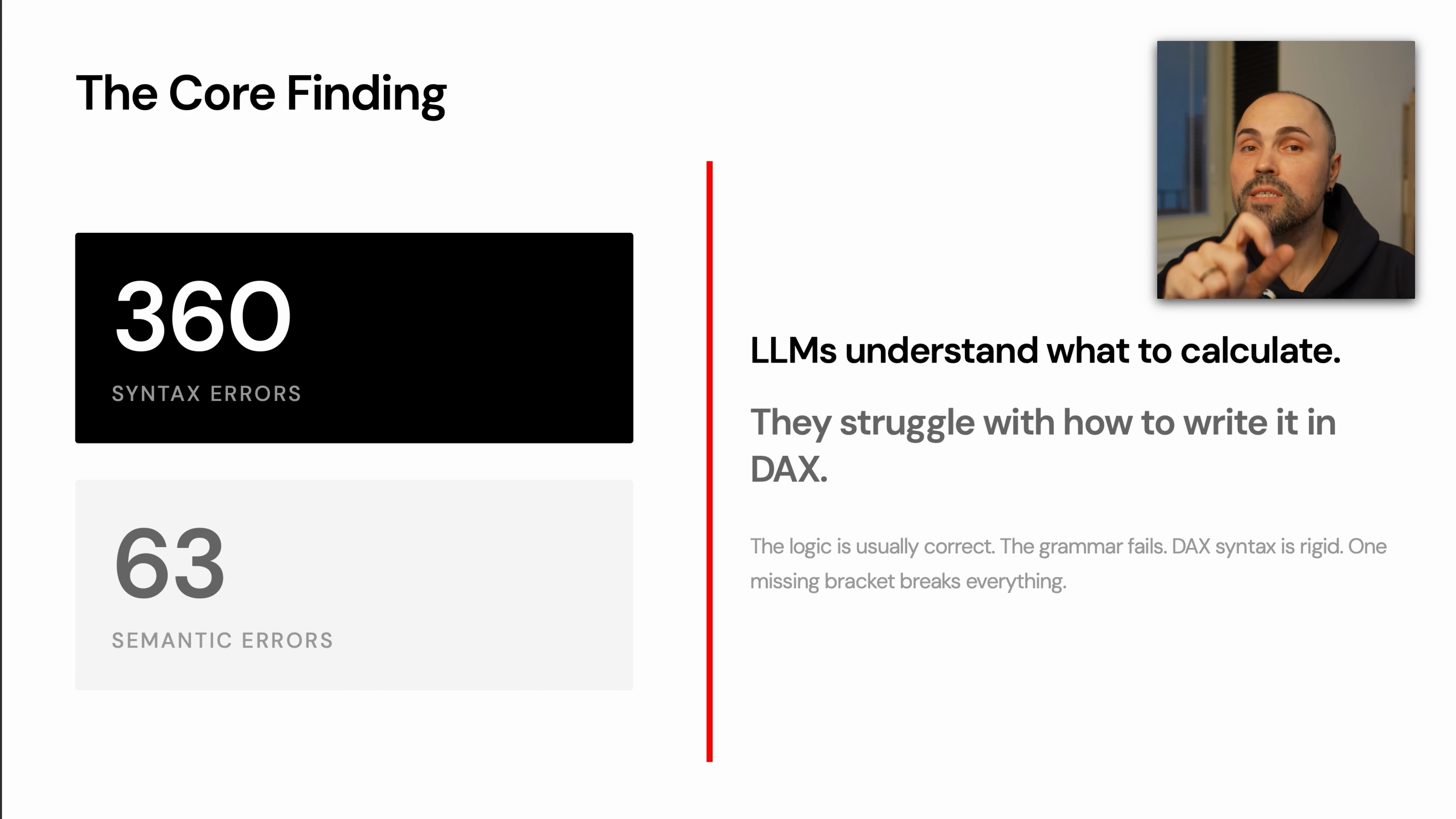
The benchmark split is the key takeaway:
- 360 syntax errors
- 63 semantic errors
That means many models understood the requested calculation but failed to express it in valid DAX. The logic was often close. The implementation failed because DAX is rigid.
Typical syntax-sensitive failure points include:
- skipped optional parameters
- missing commas in functions such as
RANKX - SQL functions written as if they existed in DAX
- Python-style column notation
- invalid variable scoping
- inefficient iterator patterns
For practical work, this changes how you should review AI-generated DAX. Do not start by debating whether the model understood the business question. First check whether the expression can compile.
TIP
Start every AI-generated DAX review with syntax. If the measure does not compile, the explanation and business logic do not matter yet.
Pick the Model for the Type of DAX Work
The benchmark grouped providers into recognizable patterns. These are not universal laws, but they are useful heuristics when choosing a model for Power BI work.
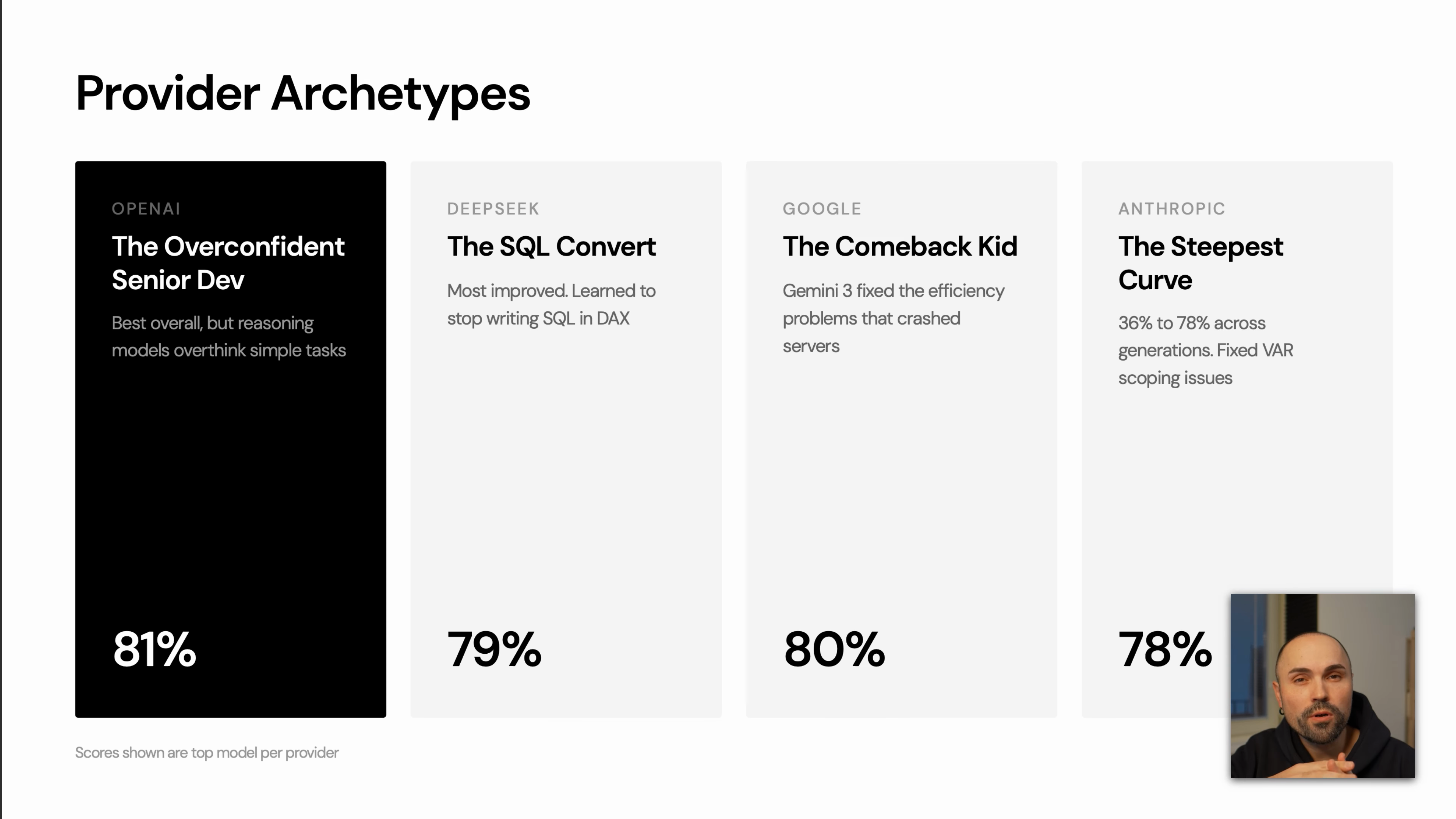
OpenAI: Strong, but Some Reasoning Models Overthink
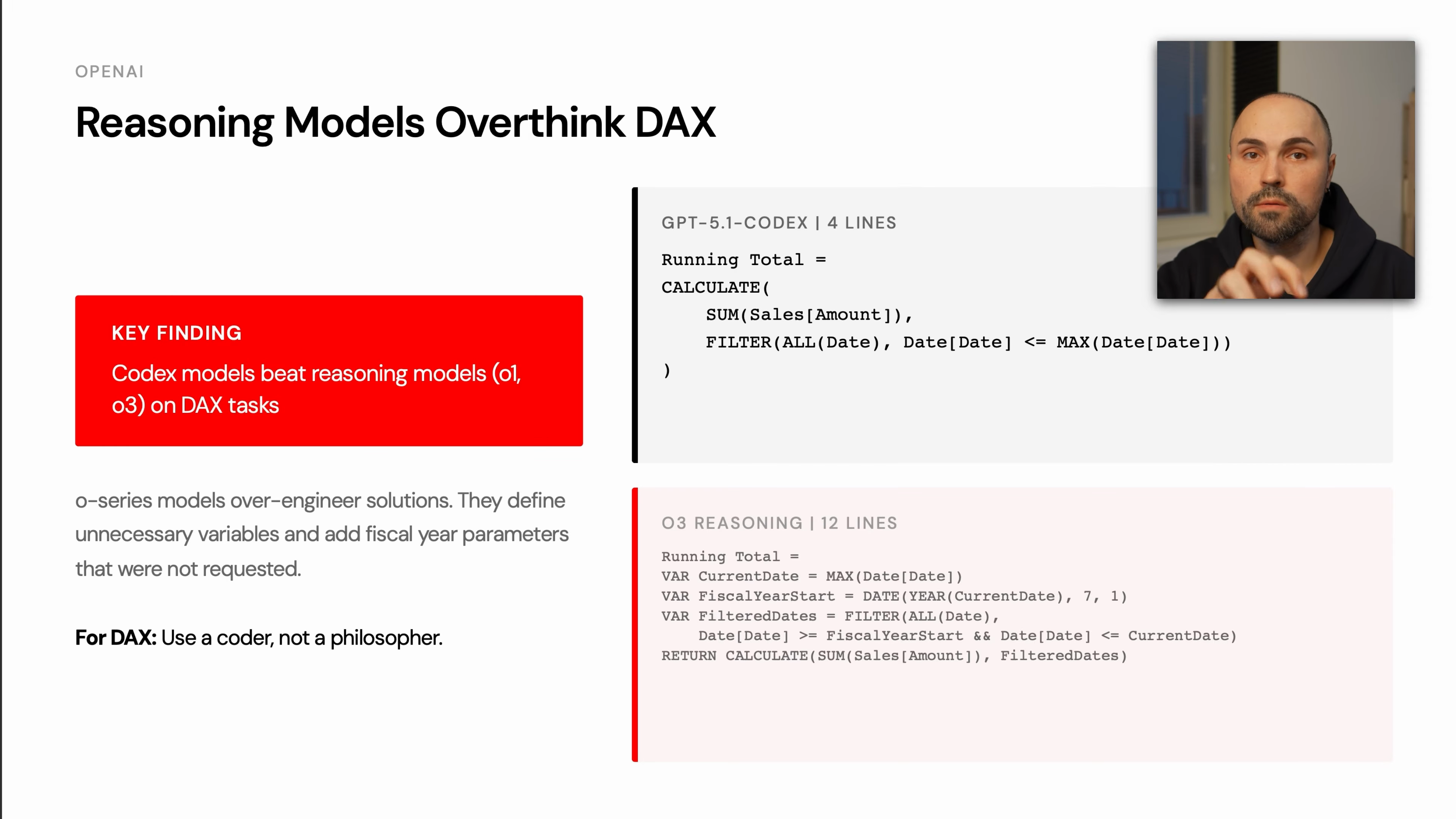
OpenAI models performed well overall, but the benchmark showed a clear pattern: larger reasoning models can over-engineer simple DAX tasks.
For DAX, that matters. Extra variables, unnecessary fiscal-year handling, or speculative filter logic increase the chance of syntax or semantic mistakes. The benchmark example compared a concise Codex-style solution against a longer reasoning-model answer. The shorter version solved the task in a few lines; the longer version introduced more moving parts and therefore more ways to fail.
Practical guidance:
- Use strong coding-oriented models for routine DAX generation.
- Be cautious when a reasoning model writes much more code than the task requires.
- Prefer simple, idiomatic DAX unless the problem genuinely needs complex context manipulation.
DeepSeek: Major Improvement in DAX Coherence
DeepSeek showed one of the largest improvements between earlier and later versions. Earlier outputs mixed DAX with SQL-like syntax. The newer model stayed much closer to valid DAX.
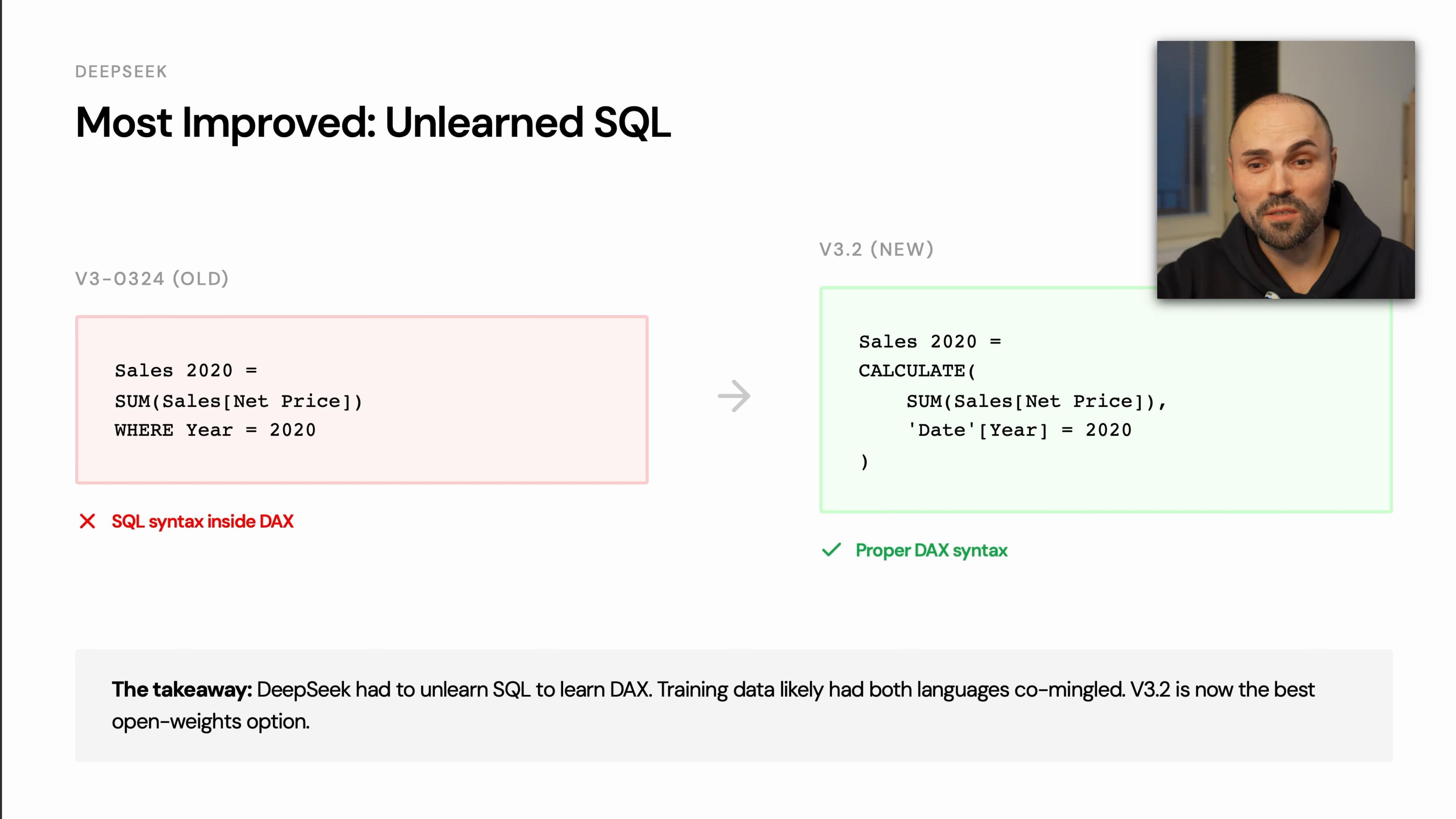
The important pattern is language separation. When models are unsure, they often fall back to languages with more training data, especially SQL. A good DAX model must resist that pull.
Practical guidance:
- DeepSeek V3.2 is a credible open-weights option for DAX work.
- Smaller models remain risky for production DAX.
- Treat any SQL-looking expression as a warning sign, even if the business logic seems right.
Google: Big Jump From Gemini 2 to Gemini 3
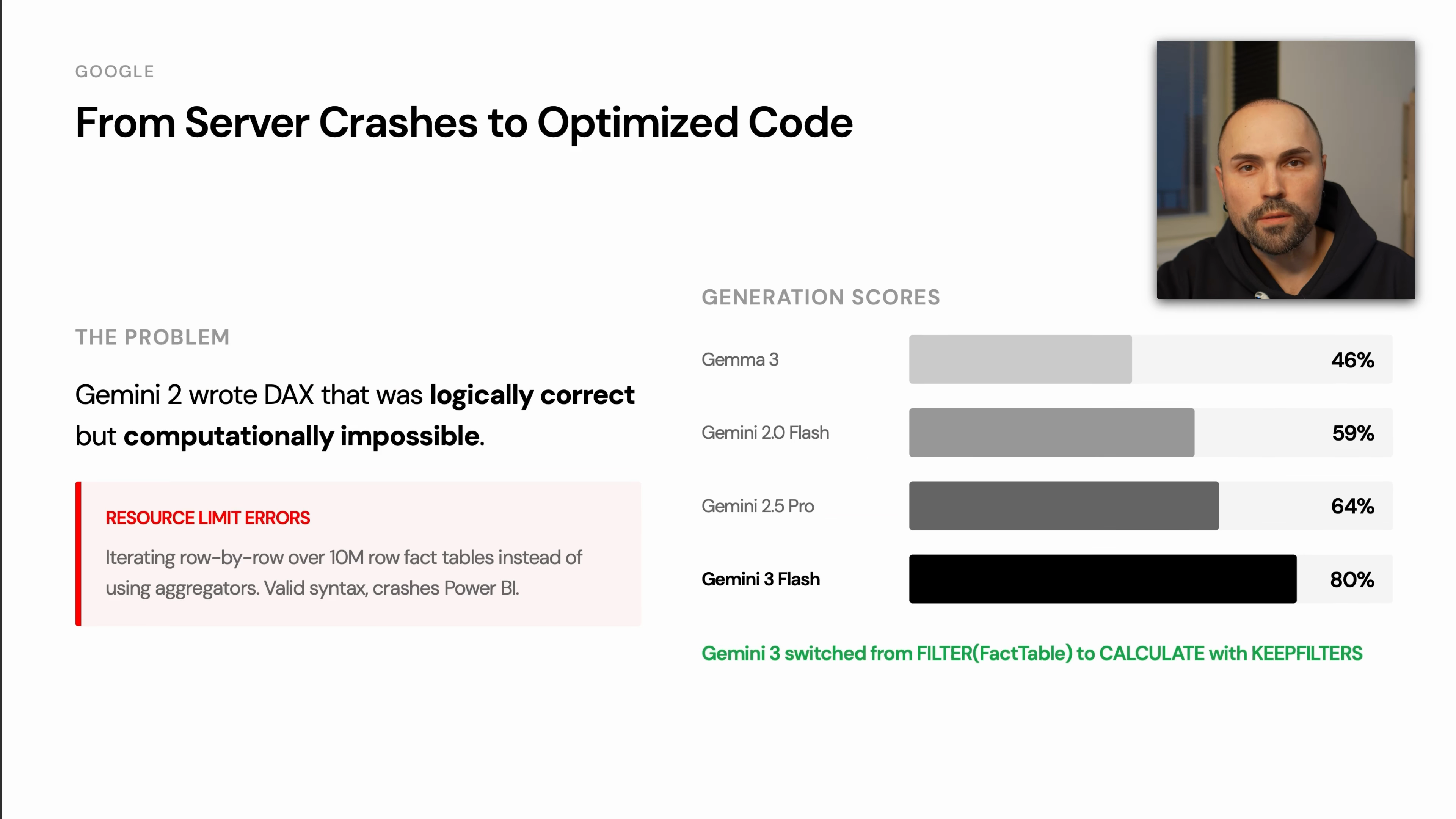
The benchmark described Gemini 2 as producing DAX that could be logically correct but computationally impractical. In one case, the generated expression was inefficient enough to crash the benchmarking instance.
Gemini 3 Flash and Gemini 3 Pro performed much better, with the transcript highlighting improved use of CALCULATE and KEEPFILTERS.
Practical guidance:
- Avoid judging a provider only by older model behavior.
- For DAX, performance matters as much as correctness.
- Watch for row-by-row iteration over large fact tables when a filter-based solution would be cleaner.
Anthropic: Clean and Consistent Output
Claude Opus was described as one of the cleanest and most consistent models for DAX. Earlier Claude models had issues with variables and scoping, but the newer benchmarked model performed more reliably.
Practical guidance:
- Use Claude Opus when readability and consistency are priorities.
- Still review syntax and function signatures carefully.
- Pay attention to variable scope in longer generated measures.
Common Hallucinations in AI-Generated DAX
A recurring failure mode is that the model writes a function from SQL, T-SQL, or Python instead of DAX. This usually happens when the model knows the intent but reaches for a more common language pattern.
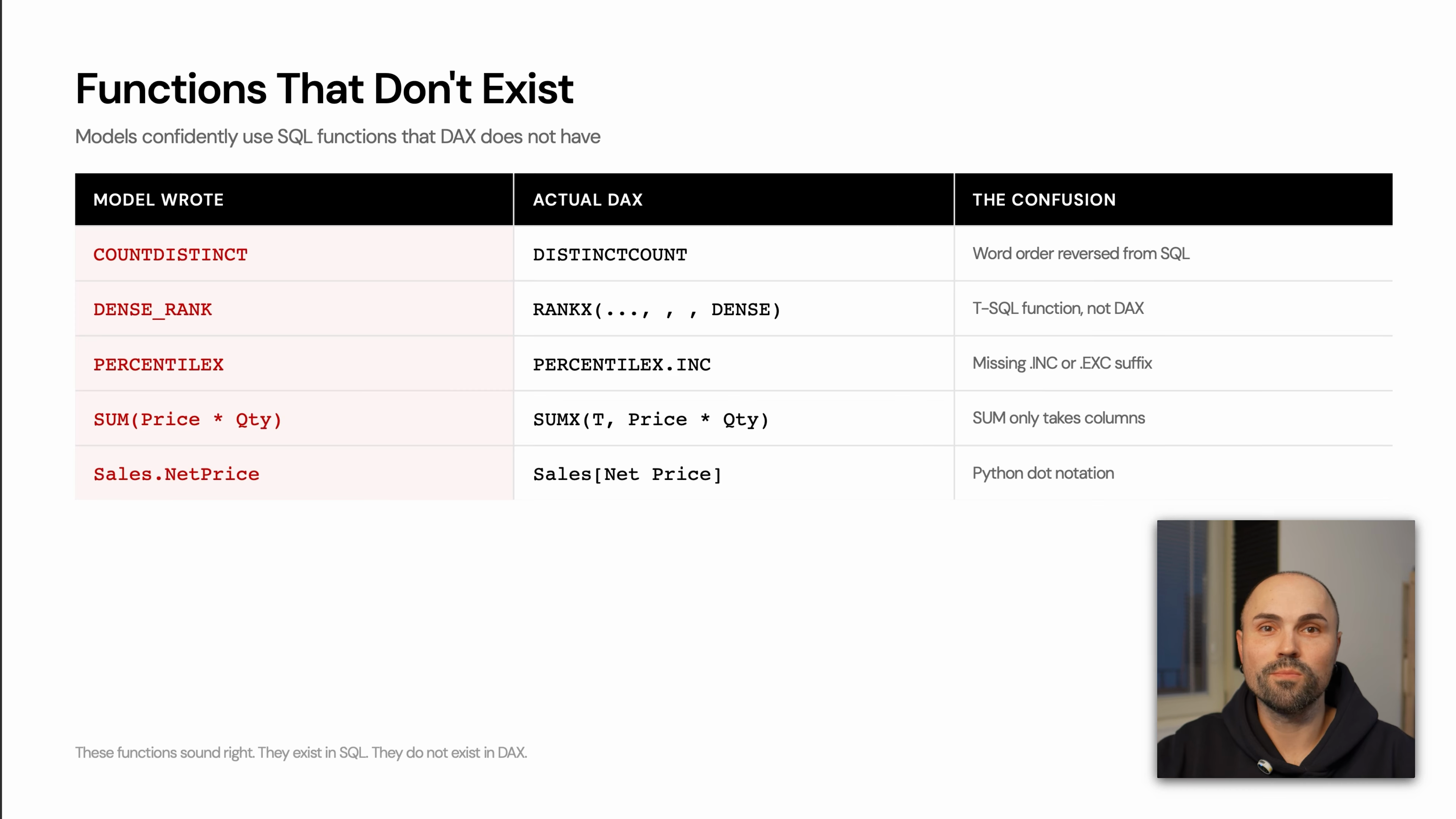
Common examples include:
| Model writes | Problem | Better DAX direction |
|---|---|---|
COUNTDISTINCT | SQL-style function name | Use DISTINCTCOUNT |
DENSE_RANK | T-SQL function, not DAX | Use RANKX with the appropriate tie behavior |
PERCENTILE style variants | Often copied from SQL or Excel patterns | Use the DAX-supported percentile function for the scenario |
SUM(Price * Qty) | SQL-style row expression inside aggregation | Use an iterator such as SUMX |
Sales.NetPrice | Python/dot notation habit | Use DAX column notation such as Sales[Net Price] |
The pattern is more important than any single example: if the expression looks like SQL, Python, or Excel, verify it against DAX syntax before trusting it.
The RANKX Trap: One Missing Comma Can Break the Measure
The biggest single failure pattern in the benchmark was RANKX. According to the transcript, 40% of ranking failures came from one syntax issue: a missing comma related to optional parameters.
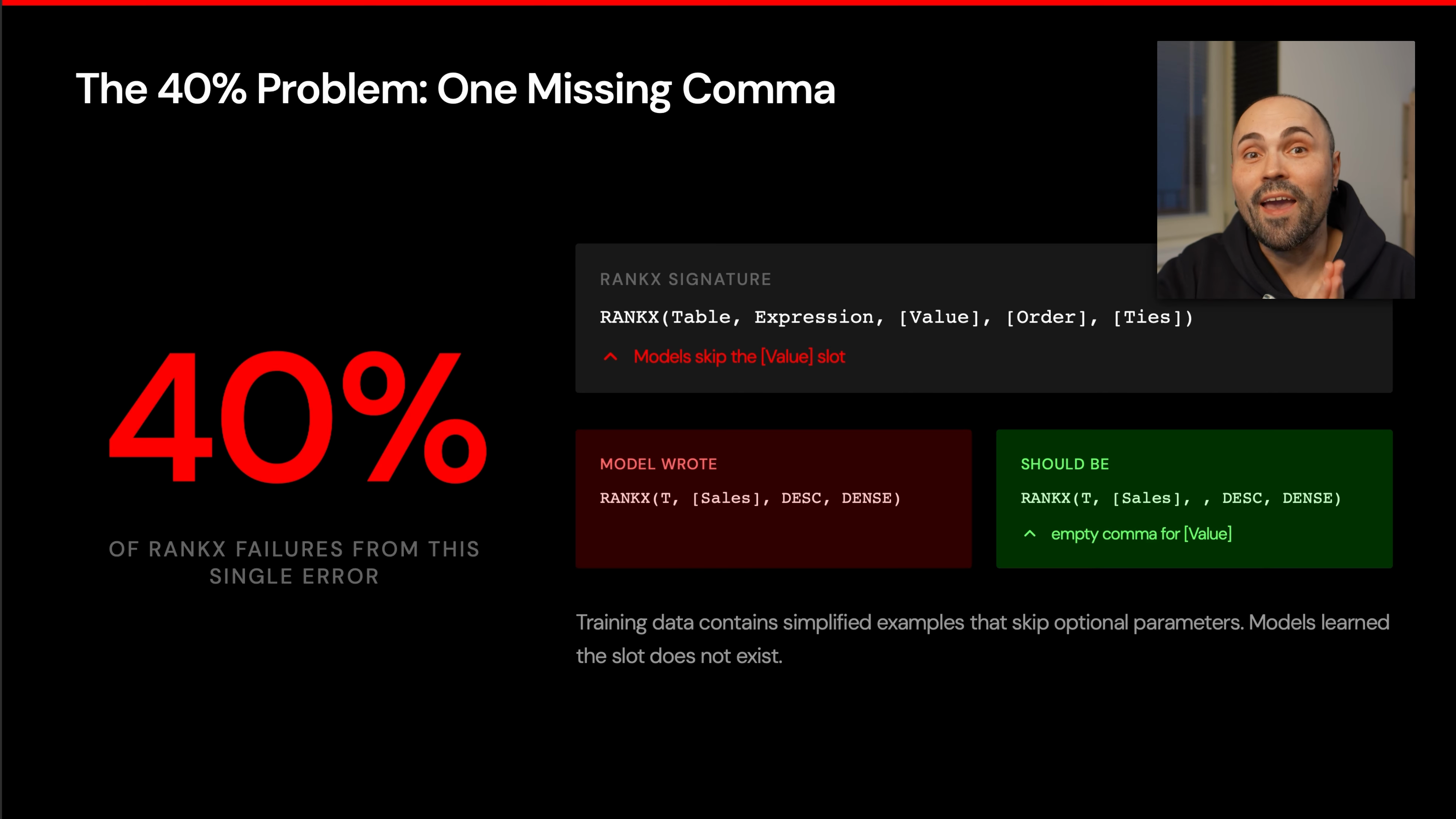
The issue is subtle because the logic can be right. The model may know the expression to rank, the order, and the tie behavior. But if it skips the placeholder for an optional parameter, DAX parses the arguments incorrectly or fails to compile.
WARNING
For AI-generated ranking measures, never skim the RANKX call. Read every comma and confirm skipped optional arguments are still represented.
The safe review habit:
- Check the full function signature.
- Count the arguments.
- Preserve commas for skipped optional parameters.
- Verify
OrderandTiesare in the intended positions. - Test the measure in Power BI before reusing the pattern.
Recommended Models Based on the Benchmark
For practical Power BI and DAX work, the transcript gives a clear recommendation set:
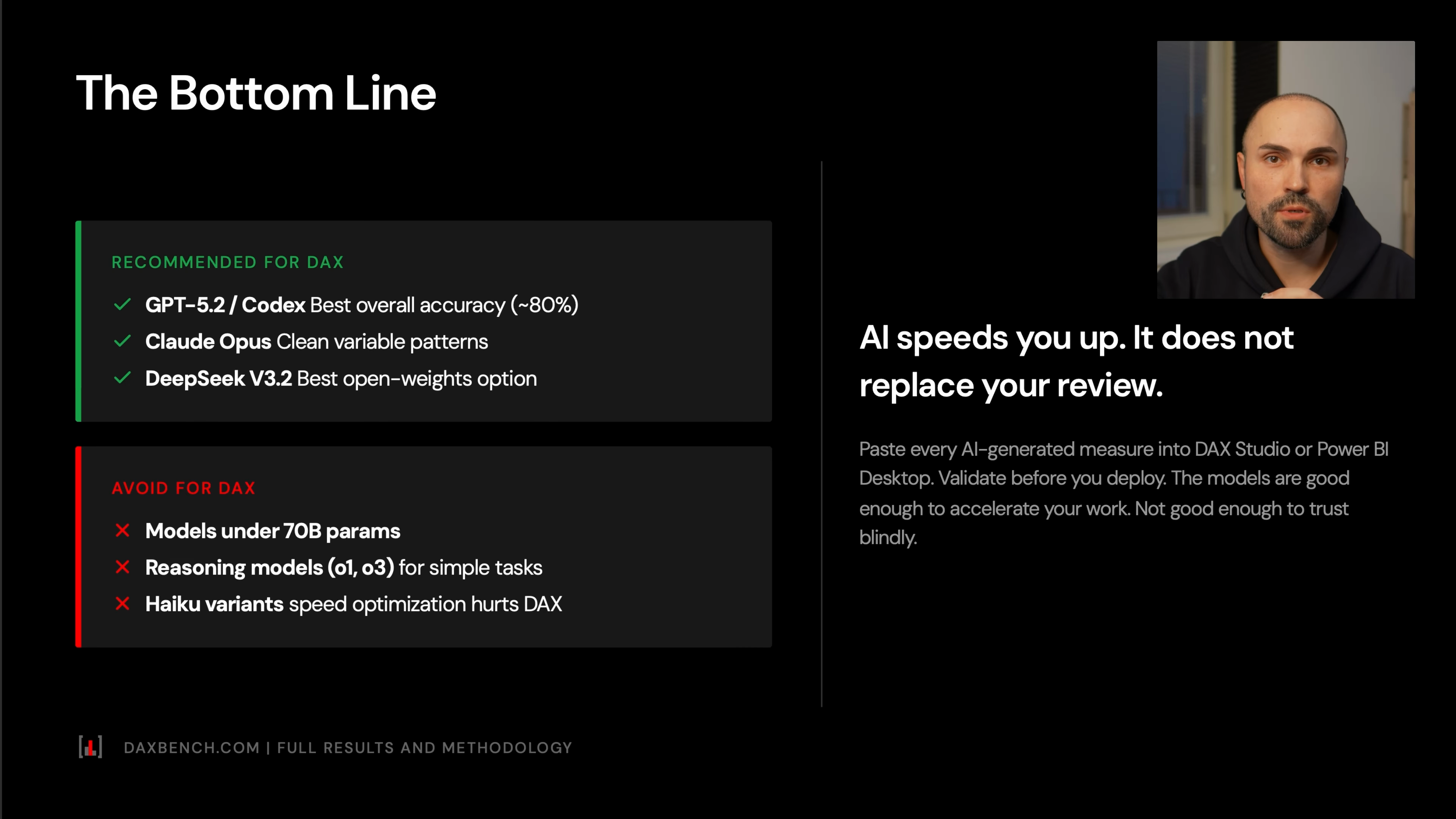
Use:
- GPT-5.2 for best overall DAX accuracy.
- Codex when available, especially for coding-style DAX tasks.
- Claude Opus when you want clean, consistent DAX.
- DeepSeek V3.2 when you want an open-weights or lower-cost option.
Avoid for serious DAX workloads:
- models under 70B parameters
- large reasoning models for simple DAX tasks when they overcomplicate the solution
- models that produce SQL-like or Python-like syntax
- models known to generate inefficient optimization patterns
The broader rule is simple: AI should accelerate your DAX workflow, not replace your review.
A Practical Review Workflow for AI-Generated DAX
Use this checklist before accepting a generated measure.
NOTE
Treat this as an acceptance checklist, not a prompt checklist. It is for deciding whether generated DAX is safe to keep.
Compile first
Paste the DAX into Power BI or your DAX editor and confirm it parses.
Scan for non-DAX functions
Look for SQL-style names such as
COUNTDISTINCT,DENSE_RANK, or genericSUM(column * column)patterns.Check column notation
DAX uses table-column syntax such as
Sales[Net Price], not Python-style dot notation.Review iterator usage
If the expression uses
SUMX,FILTER, or row-by-row logic over a large fact table, confirm that the iterator is necessary.Inspect
CALCULATEfiltersCheck whether filters are replacing or preserving existing context. When the intent is to add a condition without wiping existing filters, patterns such as
KEEPFILTERSmay be required.Verify ranking functions carefully
For
RANKX, count the commas and confirm optional arguments are handled correctly.Simplify over-engineered code
If the model introduces extra variables, fiscal-year assumptions, or unnecessary intermediate tables, reduce the expression to the minimal correct form.
Common Mistakes
Trusting the Explanation More Than the Code
Models often explain the right logic while writing invalid DAX. Treat the explanation as a hint, not proof.
Accepting SQL-Looking DAX
If the expression resembles SQL, assume it needs review. DAX has its own function names, evaluation model, and column syntax.
Ignoring Optional Arguments
DAX function signatures can be unforgiving. RANKX is the clearest example: a missing comma can break an otherwise valid idea.
Using the Most Expensive Reasoning Model by Default
The benchmark showed that bigger reasoning models are not automatically better for DAX. Some overthink simple tasks and introduce avoidable complexity.
Skipping Performance Review
A measure can compile and still be too inefficient for a real model. Watch for unnecessary iterators, broad table scans, and row-by-row calculations where filter-based logic would be cleaner.
Summary
AI models are getting much better at DAX, but the main risk is still syntax and language confusion. The benchmark showed far more syntax errors than semantic errors, which means models often know what to calculate but fail to write valid DAX.
For production work, choose a strong model, prefer simple generated code, and review the expression like a DAX developer: function signatures, column notation, filter behavior, iterator cost, and RANKX commas first. AI can make Power BI development faster, but the final responsibility for correctness still sits with the person shipping the measure.